

J’ai vu passer ça l’autre jour (je ne sais plus où donc pas de « merci ») et j’ai eu envie de tester. On le trouve sur son site et GitHub.
Ce n’est pas vraiment un system hardener au sens classique du terme — kernel, AppArmor/SELinux, SSH, services, permissions, etc. SysWarden se positionne plutôt comme un outil de renforcement de la sécurité réseau pour un serveur exposé à Internet : il automatise la mise en place de protections contre les scans, bots, IP suspectes, réseaux ou pays indésirables ainsi que certaines tentatives de bruteforce SSH, le tout avec un dashboard de supervision.
Ce n’est pas un outil aussi avancé que Crowdsec et ses bouncers, ce n’est pas un superviseur comme Wazuh ou Grafana, c’est un script bash qui permet de rapidement sécuriser à minima un serveur. Même si dans le cas d’un homelab on préférera Crowdsec, plus fin dans ses réglages.
Comme je suis ballsy (ou couillon, c’est selon), je teste directement ça en prod sur mon serveur LincStation à base d’Ubuntu et qui embarque Dockge-Enhanced et pas mal de mes services dockerisés.
J’ai supprimé toutes mes règles IPtables/Fail2Ban pour repartir de 0.
root@LincStation:/home/aerya# git clone https://github.com/duggytuxy/syswarden.git
cd syswarden
chmod +x *.sh
Clonage dans 'syswarden'...
remote: Enumerating objects: 3776, done.
remote: Counting objects: 100% (76/76), done.
remote: Compressing objects: 100% (55/55), done.
remote: Total 3776 (delta 38), reused 37 (delta 21), pack-reused 3700 (from 2)
Réception d'objets: 100% (3776/3776), 1.69 Mio | 5.95 Mio/s, fait.
Résolution des deltas: 100% (2076/2076), fait.
root@LincStation:/home/aerya/syswarden# ./build.sh
[*] Initializing SysWarden Universal Build...
[*] Injecting core configurations...
[*] Injecting universal modules...
[*] Injecting main orchestrator...
[+] Build complete. Artifact generated at: dist/install-syswarden.sh
root@LincStation:/home/aerya/syswarden# ./dist/install-syswarden.sh
Plutôt rassurant, ça propose d’emblée de lister et autoriser les configurations réseaux en place
===================================================================================
 ██████╗██╗   ██╗███████╗██╗    ██╗ █████╗ ██████╗ ██████╗ ███████╗███╗   ██╗
██╔════╝╚██╗ ██╔╝██╔════╝██║    ██║██╔══██╗██╔══██╗██╔══██╗██╔════╝████╗  ██║
███████╗ ╚████╔╝ ███████╗██║ █╗ ██║███████║██████╔╝██║  ██║█████╗  ██╔██╗ ██║
╚════██║  ╚██╔╝  ╚════██║██║███╗██║██╔══██║██╔══██╗██║  ██║██╔══╝  ██║╚██╗██║
███████║   ██║   ███████║╚███╔███╔╝██║  ██║██║  ██║██████╔╝███████╗██║ ╚████║
╚══════╝   ╚═╝   ╚══════╝ ╚══╝╚══╝ ╚═╝  ╚═╝╚═╝  ╚═╝╚═════╝ ╚══════╝╚═╝  ╚═══╝
===================================================================================
               Host-based Security Orchestrator for Linux. | v0.30.3
===================================================================================

2026-05-10 08:55:03 [INFO] Detecting Operating System and Firewall Backend...
2026-05-10 08:55:03 [INFO] Loaded saved Firewall Backend: nftables

=== Step: Critical Infrastructure Whitelist ===
To prevent server lockouts, SysWarden can automatically detect and whitelist
your DNS, DHCP, Default Gateway, and Cloud Metadata IPs.
Enable Critical Infrastructure Whitelisting? (Y/n):
Et en effet, avant de passer à l’installation, il whitelist mon LAN, mon serveur DNS et mes Dockers.
2026-05-10 08:56:07 [INFO] Scanning and whitelisting critical infrastructure IPs (DNS, Gateway, Cloud Metadata)...
2026-05-10 08:56:07 [INFO] Auto-whitelisting critical Infra IP: 127.0.0.53
2026-05-10 08:56:07 [INFO] Auto-whitelisting critical Infra IP: 192.168.0.1
2026-05-10 08:56:07 [INFO] Auto-whitelisting critical Infra IP: 169.254.169.254
2026-05-10 08:56:07 [INFO] Auto-whitelisting critical Infra IP: 192.168.0.196
2026-05-10 08:56:07 [INFO] Auto-whitelisting critical Infra IP: 172.30.0.1
2026-05-10 08:56:07 [INFO] Auto-whitelisting critical Infra IP: 172.17.0.1
2026-05-10 08:56:07 [INFO] Auto-whitelisting critical Infra IP: 192.168.0.250
2026-05-10 08:56:07 [INFO] Auto-whitelisting critical Infra IP: 172.19.0.1
2026-05-10 08:56:07 [INFO] Auto-whitelisting critical Infra IP: 172.20.0.1
2026-05-10 08:56:07 [INFO] Auto-whitelisting critical Infra IP: 172.21.0.1
2026-05-10 08:56:07 [INFO] Auto-whitelisting critical Infra IP: 172.22.0.1
2026-05-10 08:56:07 [INFO] Auto-whitelisting critical Infra IP: 172.23.0.1
2026-05-10 08:56:07 [INFO] Auto-whitelisting critical Infra IP: 172.24.0.1
2026-05-10 08:56:07 [INFO] Auto-whitelisting critical Infra IP: 172.25.0.1
2026-05-10 08:56:07 [INFO] Auto-whitelisting critical Infra IP: 172.26.0.1
2026-05-10 08:56:07 [INFO] Auto-whitelisting critical Infra IP: 172.28.0.1
2026-05-10 08:56:07 [INFO] Auto-whitelisting critical Infra IP: 172.29.0.1
2026-05-10 08:56:07 [INFO] Auto-whitelisting critical Infra IP: 172.31.0.1
2026-05-10 08:56:07 [INFO] Auto-whitelisting critical Infra IP: 172.18.0.1
2026-05-10 08:56:07 [INFO] Auto-whitelisting critical Infra IP: 192.168.16.1
2026-05-10 08:56:07 [INFO] Auto-whitelisting critical Infra IP: 192.168.32.1
2026-05-10 08:56:07 [INFO] Auto-whitelisting critical Infra IP: 172.27.0.1
2026-05-10 08:56:07 [INFO] Auto-whitelisting critical Infra IP: 192.168.48.1
Il installe ensuite les MàJ et paquets nécessaires et on tombe sur la configuration
==============================================================================
                   SYSWARDEN v0.30.3 - PRE-FLIGHT CHECKLIST
==============================================================================
Before proceeding with the deployment, please ensure you have the following
information ready. If you lack any required data, press [Ctrl+C] to abort,
gather the info, and restart the script.

1. SSH CONFIGURATION
   You will need to confirm the custom SSH port used to connect to this server.

2. FIREWALL ENGINE OPTIMIZATION (RHEL/Alma/Fedora only)
   Decide whether to bypass Firewalld in favor of pure Nftables or Iptables
   for extreme performance when loading massive Threat Intelligence blocklists.

3. WIREGUARD VPN (Optional)
   Decide if you need a stealth admin VPN. If unsure, consult your SysAdmin.

4. DOCKER INTEGRATION (Optional)
   Requires Layer 3 routing adjustments for containers. If unsure, consult your SysAdmin.

5. OS HARDENING (Optional)
   Strict restrictions for privileged groups (Sudo/Wheel) & Cron. Recommended for NEW servers only.

6. GEOIP BLOCKING (Optional)
   ISO country codes to drop instantly (e.g., RU,CN,KP).
   Reference: https://www.ipdeny.com/ipblocks/

7. ASN BLOCKING (Optional)
   Target Autonomous System Numbers to drop (e.g., AS1234, AS5678).
   Reference: https://www.spamhaus.org/drop/asndrop.json

8. HA CLUSTER SYNC (Optional)
   Standby Node IP for automatic threat intelligence replication.

9. THREAT INTEL BLOCKLISTS
   [1] Standard (Web Servers)      [2] Critical (High Security)
   [3] Custom (Plaintext URL .txt) [4] Disabled

10. SIEM LOG FORWARDING (Optional)
   External SIEM IP, Port (Default: 6514), and Protocol for central log auditing.
   Required for strict ISO 27001 / NIS2 compliance.

11. ABUSEIPDB INTEGRATION (Optional)
   Requires a valid API Key to automatically report Layer 7 attackers.
   Get one at: https://www.abuseipdb.com/account/api

12. WAZUH SIEM AGENT (Optional)
   Required: Manager IP, Enrollment Port (1515), Listen Port (1514).
   If unsure about your SIEM architecture, consult your Security Admin.
==============================================================================
Press [ENTER] to begin the configuration, or [Ctrl+C] to abort...
Voici mes choix :
– j’utilise le port SSH 22 sur cette machine (auth via clé et non ouvert sur Internet)
– je ne veux pas de Wireguard pour me connecter à cette machine
– j’utilise Docker
– je ne veux pas faire de hardening, j’ai déjà mes règles sudo etc, je ne veux pas que ça me retourne ma machine
– pour le géo-blocking, vu que j’utilise des VPN et proxies, je fais léger et ne bloque que ru (Russie) cn (Chine) kp (Corée du Nord) ir (Iran) by (Biélorussie) ; ouais je sais, c’est très stéréotypé, les proxies de scanning et script kiddies ne sont pas localisés que dans ces pays là
– je ne bloque pas d’ASN
– je n’ai pas de cluster donc pas de réplication
– idem, je n’ai pas de SIEM auquel envoyer mes logs
2026-05-10 09:12:53 [INFO] Pre-Flight Checklist acknowledged. Starting interactive configuration...

=== Step: SSH Configuration ===
Please enter your current SSH Port [Default: 22]: 22
2026-05-10 09:12:58 [INFO] Ensuring SSH TCP Forwarding is strictly DISABLED...
2026-05-10 09:12:58 [INFO] SSH Port configured as: 22

=== Step: WireGuard Management VPN ===
Deploy an ultra-secure, invisible WireGuard VPN for administration?
Enable WireGuard Management VPN? (y/N): N
2026-05-10 09:13:05 [INFO] WireGuard DISABLED.

=== Step: Docker Integration ===
Do you use Docker on this server? (y/N): Y
2026-05-10 09:13:51 [INFO] Docker integration ENABLED.

=== Step: OS Security & Hardening ===
WARNING: Strict OS hardening will restrict CRON to root and remove non-root users from sudo/wheel groups.
Apply strict OS Hardening? (Recommended for NEW servers only) [y/N]: N
2026-05-10 09:13:55 [INFO] OS Hardening DISABLED. Preserving existing system permissions.

=== Step: Geo-Blocking (High-Risk Countries) ===
Do you want to block all inbound traffic from specific countries?
Enable Geo-Blocking? (y/N): Y
Enter country codes separated by space [Default: ru cn kp ir]: ru cn kp ir by
2026-05-10 09:16:46 [INFO] Geo-Blocking ENABLED for: ru cn kp ir by

=== Step: ASN Blocking (Hosters/ISPs) ===
Do you want to block entire Autonomous Systems (e.g., AS16276 for OVH)?
Enable ASN Blocking? (y/N): N
2026-05-10 09:16:53 [INFO] ASN Blocking DISABLED.

=== Step: High Availability Cluster (HA Sync) ===
SysWarden can automatically replicate its threat intelligence state to a standby node.
Enable HA Cluster Sync? (y/N): N
2026-05-10 09:16:56 [INFO] HA Cluster Sync DISABLED.

=== Step: SIEM Log Forwarding (ISO 27001/NIS2) ===
Forward EXCLUSIVELY Fail2ban L7 attack logs to an external SIEM?
Enable SIEM Forwarding? (y/N): N
Il déroule alors l’installation
=== Step 1: Select Blocklist Type ===
1) Standard List (~85,000 IPs) - Recommended for Web Servers
2) Critical List (~100,000 IPs) - Recommended for High Security
3) Custom List
4) No List (Geo-Blocking / Local rules only)
Enter choice [1/2/3/4]:1
Pour la blocklist d’IPs il utilise son propre dépôt : https://gitlab.com/duggytuxy/Data-Shield-IPv4-Blocklist
Il whitelist bien tous mes ports SSH, Docker etc
=== Step: Downloading Free OSINT Threat Feeds ===
2026-05-10 09:25:03 [INFO] Fetching CINS Army & Blocklist.de threat feeds...
Fetching CINS Army badguys list... OK
Fetching Blocklist.de (All) list... OK
2026-05-10 09:25:05 [INFO] Sanitizing OSINT IPs and merging with the main blocklist...
2026-05-10 09:25:05 [INFO] OSINT feeds successfully merged into the core firewall memory.
2026-05-10 09:25:05 [INFO] Scanning User-Space for actively listening TCP services...
2026-05-10 09:25:05 [INFO] Whitelisted active services (TCP): [22,53,80,807,817,936,1610,2321,3012,3029,3389,3967,4437,5001,5055,5076,7000,7575,7878,7973,8081,8537,8887,8989,9377,9696,10000,27960,32855,32857,51820,59864]
Active fail2ban
=== Step 5: Service Integration Check ===
2026-05-10 09:25:21 [INFO] Fail2ban is ACTIVE. Jails:   apache-auth, apache-scanner, drupal-auth, nginx-http-auth, nginx-scanner, openvpn-custom, sshd, syswarden-aibots, syswarden-apache-tls, syswarden-apimapper, syswarden-atlassian, syswarden-badbots, syswarden-dolibarr, syswarden-generic-auth, syswarden-httpflood, syswarden-idor-enum, syswarden-jndi-ssti, syswarden-lfi-advanced, syswarden-portscan, syswarden-prestashop, syswarden-privesc, syswarden-proxy-abuse, syswarden-recidive, syswarden-revshell, syswarden-secretshunter, syswarden-silent-scanner, syswarden-sqli-xss, syswarden-ssrf, syswarden-tls-guard, syswarden-webshell, wireguard, wordpress-auth
Je ne souhaite pas communiquer des abuse d’IP
=== Step 7: AbuseIPDB Reporting Setup ===
Would you like to automatically report blocked IPs to AbuseIPDB?
Enable AbuseIPDB reporting? (y/N): N
Ni installer d’agent Wazuh (un SIEM)
=== Step 8: Wazuh Agent Installation (Custom) ===
Install Wazuh Agent? (y/N): N
Et l’installation se termine
INSTALLATION SUCCESSFUL
 -> List loaded: Standard
 -> Mode: Universal (Interactive)
 -> Protection: Active
J’ai donc accès au dashboard sur le port 9999 en https
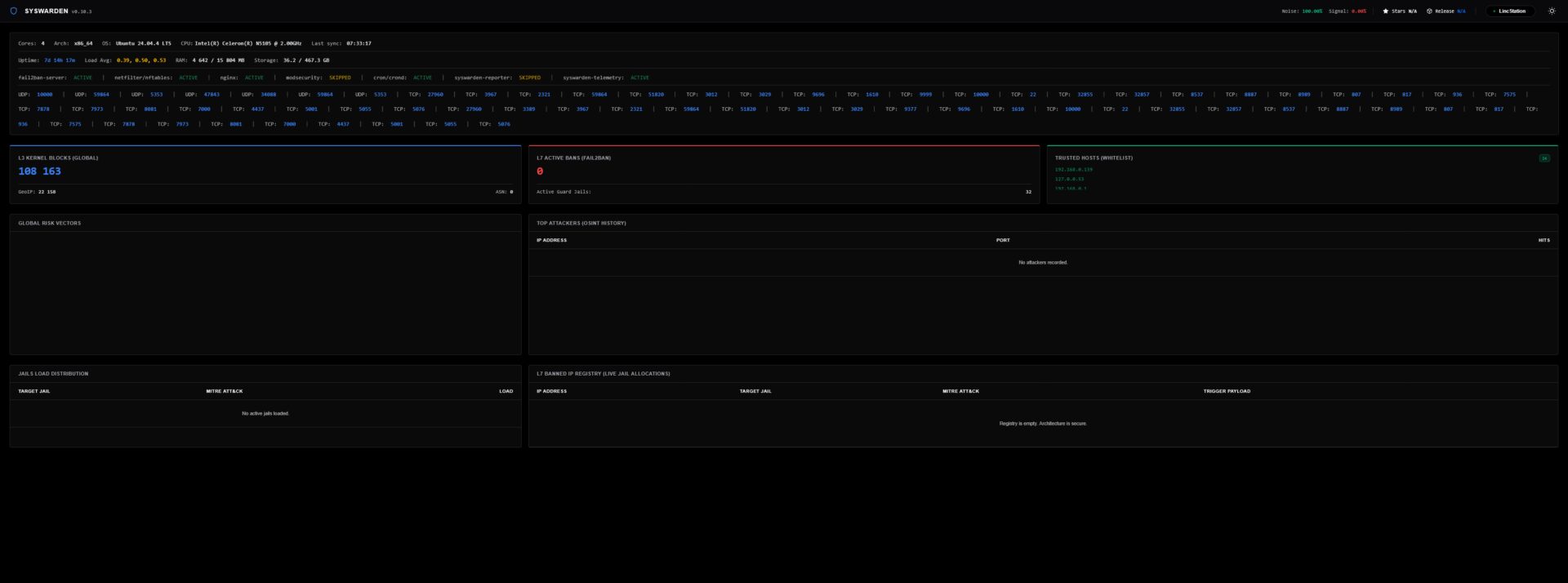
J’ai dû relancer le service Docker pour que tout refonctionne
root@LincStation:/home/aerya/docker# sudo systemctl restart docker
root@LincStation:/home/aerya/docker# sudo iptables -t nat -L DOCKER -n
Chain DOCKER (2 references)
target     prot opt source               destination
DNAT       6    --  0.0.0.0/0            0.0.0.0/0            tcp dpt:7973 to:172.27.0.2:7000
DNAT       6    --  0.0.0.0/0            0.0.0.0/0            tcp dpt:3967 to:172.29.0.2:8080
DNAT       6    --  0.0.0.0/0            0.0.0.0/0            tcp dpt:807 to:172.20.0.2:80
DNAT       6    --  0.0.0.0/0            0.0.0.0/0            tcp dpt:817 to:172.20.0.2:81
DNAT       6    --  0.0.0.0/0            0.0.0.0/0            tcp dpt:4437 to:172.20.0.2:443
DNAT       6    --  0.0.0.0/0            0.0.0.0/0            tcp dpt:32855 to:172.24.0.2:3000
DNAT       6    --  0.0.0.0/0            0.0.0.0/0            tcp dpt:32857 to:172.21.0.2:3232
DNAT       6    --  0.0.0.0/0            0.0.0.0/0            tcp dpt:7000 to:172.23.0.2:7000
DNAT       6    --  0.0.0.0/0            0.0.0.0/0            tcp dpt:5001 to:172.18.0.2:5001
DNAT       6    --  0.0.0.0/0            0.0.0.0/0            tcp dpt:1610 to:172.22.0.3:1610
DNAT       6    --  0.0.0.0/0            0.0.0.0/0            tcp dpt:7575 to:172.31.0.2:7575
DNAT       6    --  0.0.0.0/0            0.0.0.0/0            tcp dpt:3029 to:172.25.0.4:3000
DNAT       6    --  0.0.0.0/0            0.0.0.0/0            tcp dpt:5055 to:172.28.0.2:5055
DNAT       6    --  0.0.0.0/0            0.0.0.0/0            tcp dpt:59864 to:172.26.0.2:6881
DNAT       17   --  0.0.0.0/0            0.0.0.0/0            udp dpt:59864 to:172.26.0.2:6881
DNAT       6    --  0.0.0.0/0            0.0.0.0/0            tcp dpt:2321 to:172.26.0.2:8080
DNAT       6    --  0.0.0.0/0            0.0.0.0/0            tcp dpt:3012 to:192.168.48.3:3000
DNAT       6    --  0.0.0.0/0            0.0.0.0/0            tcp dpt:8537 to:192.168.16.6:8080
DNAT       6    --  0.0.0.0/0            0.0.0.0/0            tcp dpt:27960 to:172.17.0.2:27960
Et il bloque en effet quelques IPs (screen une fois une MàJ effectuée, voir plus bas)
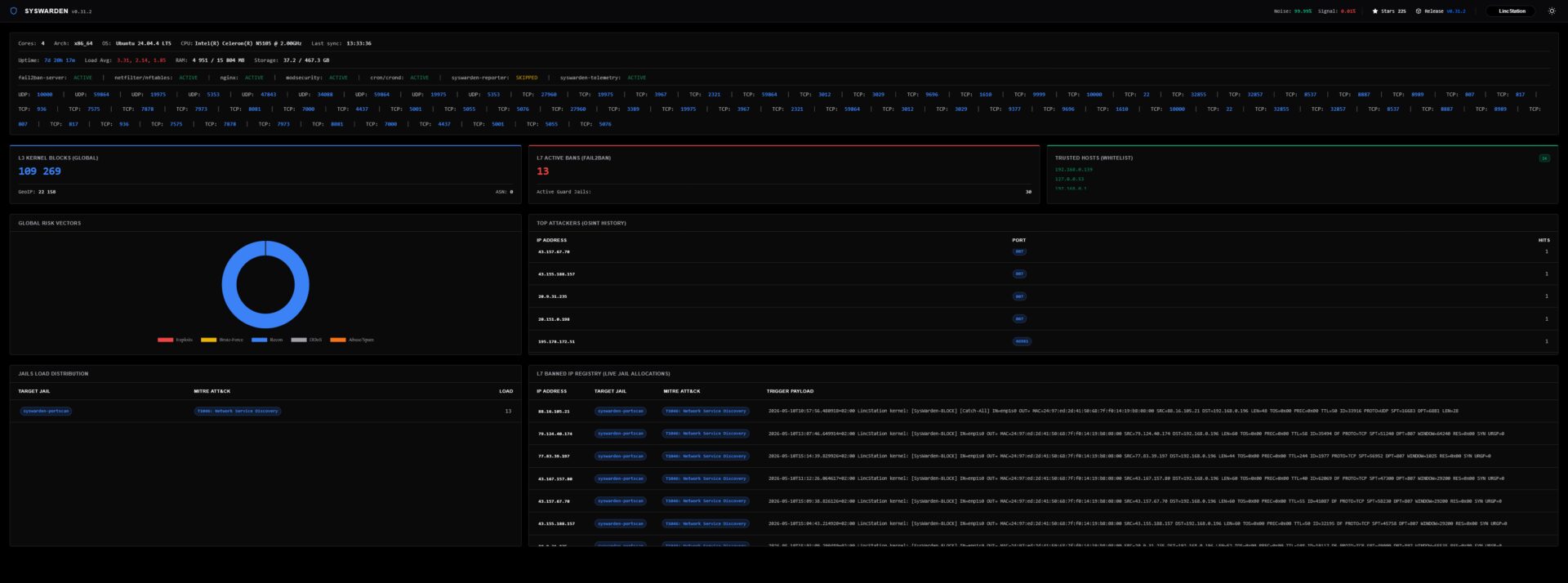
Pour aller plus loin, on trouve 3 scripts dans le dossier /tools :
syswarden-audit.sh syswarden-manager.sh syswarden-waf.shL’audit
==============================================================================
 SysWarden DevSecOps Audit - Execution Mode
==============================================================================
  1) Complete Audit Scan (All Phases 1-8)
  2) Custom Audit Scan (Select multiple specific phases)
==============================================================================
Select an option [1-2]: 2

Select the specific phases you want to audit:
  1) Phase 1: OS Hardening & Privilege Separation
  2) Phase 2: Log Routing & Anti-Injection Verification
  3) Phase 3: Kernel Shield & Threat Intelligence
  4) Phase 4: Layer 7 Active Defense (Fail2ban)
  5) Phase 5: DevSecOps Telemetry & Enterprise Dashboard
  6) Phase 6: Zero Trust Remote Access (VPN & SSH Cloaking)
  7) Phase 7: Exposed Services & Firewall Persistence (CSPM)
  8) Phase 8: Enterprise SOC & High Availability (HA Cluster)
  9) Phase 9: Ghost Rules & Firewall Idempotency (Anti-Duplication)

Enter phase numbers separated by space (e.g., 1 3 9):
Le manager
======================================================
  SysWarden Manager CLI (v0.30.3) - Day 2 Operations
======================================================
Usage: syswarden-manager.sh [COMMAND] [IP] [PORT]

Commands:
  check <IP>             : Full XDR diagnostic of an IP (Files, F2B, Kernel)
  block <IP>             : Hot-adds IP to kernel drop set and blocklist file
  unblock <IP>           : Purges IP from blocklist, kernel, and Fail2ban
  whitelist <IP>         : Grants absolute VIP access & bypasses firewall
  whitelist-infra        : Auto-detects and whitelists DNS, Gateway, DHCP, etc.
  allow-ssh <IP> [PORT]  : Allows direct SSH access for this IP
  revoke-ssh <IP>        : Revokes direct SSH access for this IP
  list                   : Displays all manually whitelisted and blocked IPs
  reload                 : Forces main scripts to safely re-sync entirely

Examples:
  syswarden-manager.sh allow-ssh 203.0.113.50 2222
  syswarden-manager.sh block 8.8.8.8
  syswarden-manager.sh list
======================================================
Et le WAF qui déclenche, sans demander confirmation (quand je dis que je suis ballsy!) l’installation de ModSecurity en le compilant.
===================================================================================
                  SysWarden WAF - ModSecurity v3 Orchestrator
===================================================================================
2026-05-10 15:03:44 [INFO] Detecting Operating System for WAF compilation...
2026-05-10 15:03:44 [INFO] OS Detected: ubuntu 24.04
2026-05-10 15:03:44 [INFO] Installing compilation dependencies for ModSecurity v3.0.15...

[...]

[+] ModSecurity v3.0.15 and OWASP CRS deployed successfully!
[i] The WAF is strictly linked to SysWarden's Fail2ban [syswarden-modsec] jail via /var/log/modsec_audit.log.
Et pour mettre à jour il faut recommencer l’étape de clonage du dépôt puis exécution du script. Fort heureusement, ça peut s’automatiser, par exemple via un script Bash et placé en cron toutes les 24, 48h ou autre.
Que j’enregistre dans update-syswarden.sh et le rends exécutable (chmod +x update-syswarden.sh)
#!/usr/bin/env bash
set -euo pipefail

# ============================================================
# SysWarden Update Script
# Clone/pull le dépôt, rebuild l'installateur,
# puis lance uniquement le mode UPDATE de SysWarden.
#
# Ne relance PAS le wizard complet.
# ============================================================

REPO_URL="https://github.com/duggytuxy/syswarden.git"
BASE_DIR="/home/aerya"
REPO_DIR="${BASE_DIR}/syswarden"
BACKUP_DIR="/root/syswarden-backups/$(date +%Y%m%d-%H%M%S)"

echo "============================================================"
echo " SysWarden updater"
echo "============================================================"
echo

if [[ "${EUID}" -ne 0 ]]; then
  echo "[ERREUR] Ce script doit être lancé en root."
  exit 1
fi

echo "[1/6] Préparation du dossier de sauvegarde..."
mkdir -p "${BACKUP_DIR}"

echo "[2/6] Sauvegarde de l'état actuel..."

iptables-save > "${BACKUP_DIR}/iptables.rules" 2>/dev/null || true
ip6tables-save > "${BACKUP_DIR}/ip6tables.rules" 2>/dev/null || true
nft list ruleset > "${BACKUP_DIR}/nft.rules" 2>/dev/null || true

[[ -d /etc/syswarden ]] && cp -a /etc/syswarden "${BACKUP_DIR}/etc-syswarden"
[[ -f /etc/syswarden.conf ]] && cp -a /etc/syswarden.conf "${BACKUP_DIR}/syswarden.conf"
[[ -d /etc/fail2ban ]] && cp -a /etc/fail2ban "${BACKUP_DIR}/etc-fail2ban"

echo "[OK] Sauvegardes créées dans : ${BACKUP_DIR}"
echo

echo "[3/6] Clone ou mise à jour du dépôt SysWarden..."

if [[ -d "${REPO_DIR}/.git" ]]; then
  echo "[INFO] Dépôt existant trouvé : ${REPO_DIR}"
  cd "${REPO_DIR}"

  echo "[INFO] Récupération de la dernière version..."
  git fetch --all --prune
  git reset --hard origin/main
  git clean -fd
else
  echo "[INFO] Clonage du dépôt..."
  cd "${BASE_DIR}"
  git clone "${REPO_URL}" "${REPO_DIR}"
  cd "${REPO_DIR}"
fi

echo
echo "[4/6] Permissions sur les scripts..."
chmod +x ./*.sh 2>/dev/null || true
find . -type f -name "*.sh" -exec chmod +x {} \;

echo
echo "[5/6] Build de SysWarden..."
./build.sh

INSTALLER="${REPO_DIR}/dist/install-syswarden.sh"

if [[ ! -f "${INSTALLER}" ]]; then
  echo "[ERREUR] Installateur introuvable : ${INSTALLER}"
  exit 1
fi

chmod +x "${INSTALLER}"

echo
echo "[6/6] Lancement de l'UPDATE SysWarden..."
echo "[INFO] Commande exécutée : ${INSTALLER} update"
echo

"${INSTALLER}" update

echo
echo "============================================================"
echo " Update SysWarden terminée"
echo "============================================================"
echo
echo "Dépôt local :"
echo "  ${REPO_DIR}"
echo
echo "Installateur généré :"
echo "  ${INSTALLER}"
echo
echo "Sauvegardes créées :"
echo "  ${BACKUP_DIR}"
echo
echo "Commandes utiles après update :"
echo
echo "  Vérifier Fail2ban :"
echo "    fail2ban-client status"
echo
echo "  Vérifier la jail portscan :"
echo "    fail2ban-client status syswarden-portscan"
echo
echo "  Vérifier Docker NAT :"
echo "    iptables -t nat -L DOCKER -n"
echo
echo "  Si Docker a perdu sa chaîne NAT :"
echo "    systemctl restart docker"
echo "    iptables -t nat -L DOCKER -n"
echo
echo "  Vérifier les ports écoutés :"
echo "    ss -lntup"
echo
echo "  Vérifier les règles SysWarden/nftables :"
echo "    nft list ruleset | grep -i syswarden -C 5"
echo
echo "  Vérifier les règles iptables liées à SysWarden :"
echo "    iptables-save | grep -i syswarden -C 5"
echo
echo "Restauration possible depuis :"
echo "  ${BACKUP_DIR}"
echo
Au lancement il clone le dépôt GitHub pour avoir la dernière version du code et lancer l’installateur en mode mise à jour (./dist/install-syswarden.sh update).
J’ai prévu un backup au passage quand même et rappelle quelques commandes de base
============================================================
 SysWarden updater
============================================================

[1/6] Préparation du dossier de sauvegarde...
[2/6] Sauvegarde de l'état actuel...
[OK] Sauvegardes créées dans : /root/syswarden-backups/20260510-152941

[3/6] Clone ou mise à jour du dépôt SysWarden...
[INFO] Dépôt existant trouvé : /home/aerya/syswarden
[INFO] Récupération de la dernière version...
HEAD est maintenant à 0676905 ⚡ 0.31.2 ⚡ : Minor fixes (Please, check release notes for more info)

[4/6] Permissions sur les scripts...

[5/6] Build de SysWarden...
[*] Initializing SysWarden Universal Build...
[*] Injecting core configurations...
[*] Injecting universal modules...
[*] Injecting modular Fail2ban jails...
[*] Injecting main orchestrator...
[+] Build complete. Artifact generated at: dist/install-syswarden.sh

[6/6] Lancement de l'UPDATE SysWarden...
[INFO] Commande exécutée : /home/aerya/syswarden/dist/install-syswarden.sh update

2026-05-10 15:29:43 [INFO] Detecting Operating System and Firewall Backend...
2026-05-10 15:29:43 [INFO] Loaded saved Firewall Backend: nftables
2026-05-10 15:29:43 [INFO] Scanning and whitelisting critical infrastructure IPs (DNS, Gateway, Cloud Metadata)...
2026-05-10 15:29:43 [INFO] Update Mode: Loaded configuration (Type: Standard)
2026-05-10 15:29:43 [INFO] Update Mode: keeping mirror https://gitlab.com/duggytuxy/data-shield-ipv4-blocklist/-/raw/main/prod_data-shield_ipv4_blocklist.txt

=== Step 3: Downloading Blocklist ===
2026-05-10 15:29:43 [INFO] Fetching list from https://gitlab.com/duggytuxy/data-shield-ipv4-blocklist/-/raw/main/prod_data-shield_ipv4_blocklist.txt...
2026-05-10 15:29:44 [INFO] Download success.

=== Step: Downloading Free OSINT Threat Feeds ===
2026-05-10 15:29:44 [INFO] Fetching CINS Army & Blocklist.de threat feeds...
Fetching CINS Army badguys list... OK
Fetching Blocklist.de (All) list... OK
2026-05-10 15:29:46 [INFO] Sanitizing OSINT IPs and merging with the main blocklist...
2026-05-10 15:29:46 [INFO] OSINT feeds successfully merged into the core firewall memory.

=== Step: Downloading Geo-Blocking Data ===
Fetching IP blocks for RU... OK
Fetching IP blocks for CN... OK
Fetching IP blocks for KP... OK
Fetching IP blocks for IR... OK
Fetching IP blocks for BY... OK
2026-05-10 15:29:47 [INFO] Geo-Blocking list updated successfully.
2026-05-10 15:29:47 [INFO] Applying massive downloaded lists to active firewall...
2026-05-10 15:29:47 [INFO] Scanning User-Space for actively listening TCP services...
2026-05-10 15:29:47 [INFO] Whitelisted active services (TCP): [22,53,807,817,936,1610,2321,3012,3029,3389,3967,4437,5001,5055,5076,7000,7575,7878,7973,8081,8537,8887,8989,9377,9696,9999,10000,19975,27960,32855,32857,59864]

=== Step 4: Applying Firewall Rules (nftables) ===
2026-05-10 15:29:47 [INFO] Configuring Nftables via Atomic Transaction (Zero-Downtime)...
2026-05-10 15:29:47 [INFO] Populating Nftables sets atomically in chunks (Bypassing memory limits)...
2026-05-10 15:29:47 [INFO] Applying Atomic Nftables Transaction to the Kernel...
2026-05-10 15:29:49 [INFO] Saving SysWarden Nftables tables to isolated config...
2026-05-10 15:29:50 [INFO] Applying Global Rules to Docker (DOCKER-USER chain)...
2026-05-10 15:29:51 [INFO] Docker firewall rules applied successfully.
2026-05-10 15:29:51 [INFO] Configuring universal IPSet persistence for boot survival...
2026-05-10 15:29:52 [INFO] Applying Layer 7 Application Firewall Rules (Fail2ban)...
2026-05-10 15:29:52 [INFO] Generating Fail2ban configuration (Universal Mode)...
2026-05-10 15:29:52 [INFO] Purged fail2ban/jail.d/ directory entirely to enforce absolute Zero Trust.
2026-05-10 15:29:52 [INFO] Executing modular jail definitions...
2026-05-10 15:29:52 [INFO] Web access logs detected. Enabling AI-Bot Guard.
2026-05-10 15:29:52 [INFO] Apache logs detected. Enabling Apache Jail.
2026-05-10 15:29:52 [INFO] Apache error logs detected. Enabling mod_ssl Protocol Guard.
2026-05-10 15:29:52 [INFO] Web access logs detected. Enabling API Mapper Guard.
2026-05-10 15:29:52 [INFO] Web access logs detected. Enabling Atlassian Guard.
2026-05-10 15:29:52 [INFO] Web access logs detected. Enabling Bad-Bot & Scanner Guard.
2026-05-10 15:29:52 [INFO] Web access logs detected. Enabling Dolibarr ERP Guard.
2026-05-10 15:29:52 [INFO] Web logs detected. Enabling Drupal Guard.
2026-05-10 15:29:52 [INFO] Web access logs detected. Enabling Generic Brute-Force & Password Spraying Guard.
2026-05-10 15:29:52 [INFO] Web access logs detected. Enabling Unicode Obfuscation & Homoglyph Guard.
2026-05-10 15:29:52 [INFO] Web access logs detected. Enabling Layer 7 Anti-DDoS Guard.
2026-05-10 15:29:52 [INFO] Web access logs detected. Enabling Behavioral IDOR Guard.
2026-05-10 15:29:52 [INFO] ModSecurity WAF detected. Enabling Purple Team integration.
2026-05-10 15:29:52 [INFO] Nginx logs detected. Enabling Nginx Jails.
2026-05-10 15:29:52 [INFO] Nginx detected. Preparing TLS error logging for Syswarden.
2026-05-10 15:29:52 [INFO] Nginx error_log is already set to 'info'. No changes needed.
2026-05-10 15:29:52 [INFO] OpenVPN detected. Enabling OpenVPN Jail.
2026-05-10 15:29:52 [INFO] Kernel logs detected. Enabling Port Scanner Guard.
2026-05-10 15:29:52 [INFO] Web access logs detected. Enabling PrestaShop Guard.
2026-05-10 15:29:52 [INFO] PAM/Auth logs detected. Enabling Privilege Escalation Guard (Su/Sudo).
2026-05-10 15:29:52 [INFO] Web access logs detected. Enabling Open Proxy & Exotic Method Guard.
2026-05-10 15:29:52 [INFO] Web access logs detected. Enabling Reverse Shell & RCE Guard.
2026-05-10 15:29:52 [INFO] Web access logs detected. Enabling Stealth Secrets Hunter Guard.
2026-05-10 15:29:52 [INFO] Web access logs detected. Enabling Behavioral Scanner Guard.
2026-05-10 15:29:52 [INFO] Web access logs detected. Enabling SSRF & Cloud Metadata Guard.
2026-05-10 15:29:52 [INFO] WireGuard detected. Enabling UDP Jail.
2026-05-10 15:29:52 [INFO] Web logs available. Configuring WordPress Jail.
2026-05-10 15:29:52 [INFO] Starting Fail2ban service...

=== Step 5: Service Integration Check ===
2026-05-10 15:29:56 [INFO] Fail2ban is ACTIVE. Jails:   apache-auth, apache-scanner, drupal-auth, nginx-http-auth, nginx-scanner, openvpn-custom, sshd, syswarden-aibots, syswarden-apache-tls, syswarden-apimapper, syswarden-atlassian, syswarden-badbots, syswarden-dolibarr, syswarden-generic-auth, syswarden-homoglyph, syswarden-httpflood, syswarden-idor-enum, syswarden-modsec, syswarden-portscan, syswarden-prestashop, syswarden-privesc, syswarden-proxy-abuse, syswarden-recidive, syswarden-revshell, syswarden-secretshunter, syswarden-silent-scanner, syswarden-ssrf, syswarden-tls-guard, wireguard, wordpress-auth
2026-05-10 15:29:56 [INFO] Installation of the advanced telemetry engine (Backend)...
2026-05-10 15:30:03 [INFO] Generating the Enterprise SaaS Nginx Dashboard (SPA/CSP)...
2026-05-10 15:30:03 [INFO] Configuring Nginx VHost for port 9999...
2026-05-10 15:30:03 [INFO] Opening Port 9999 in OS Firewall to enable Dashboard routing...
2026-05-10 15:30:05 [INFO] Dashboard UI secured by Web Server at https://1920.168.0.196:9999
2026-05-10 15:30:05 [INFO] Restarting Fail2ban engine to compile new definitions...

UPDATE SUCCESSFUL
 -> SysWarden Engine (L2/L3 & L7) and Dashboard UI have been updated to the latest version.

============================================================
 Update SysWarden terminée
============================================================

Dépôt local :
  /home/aerya/syswarden

Installateur généré :
  /home/aerya/syswarden/dist/install-syswarden.sh

Sauvegardes créées :
  /root/syswarden-backups/20260510-152941

Commandes utiles après update :

  Vérifier Fail2ban :
    fail2ban-client status

  Vérifier la jail portscan :
    fail2ban-client status syswarden-portscan

  Vérifier Docker NAT :
    iptables -t nat -L DOCKER -n

  Si Docker a perdu sa chaîne NAT :
    systemctl restart docker
    iptables -t nat -L DOCKER -n

  Vérifier les ports écoutés :
    ss -lntup

  Vérifier les règles SysWarden/nftables :
    nft list ruleset | grep -i syswarden -C 5

  Vérifier les règles iptables liées à SysWarden :
    iptables-save | grep -i syswarden -C 5

Restauration possible depuis :
  /root/syswarden-backups/20260510-152941
SysWarden est un outil simple à prendre en main qui orchestre iptables/nftables et Fail2Ban pour bloquer des IPs suspectes, des pays/ASN ou des comportements malveillants sur les ports ouverts. Contrairement à CrowdSec, il ne repose pas sur une intelligence communautaire partagée, mais plutôt sur des listes externes et des règles locales.
Il prend aussi en compte Docker : les ports publiés sont détectés et intégrés automatiquement aux règles firewall, avec filtrage GeoIP/blacklist via DOCKER-USER.